In the woodworking machinery market, there is no "best" machine—only the right machine for the job.
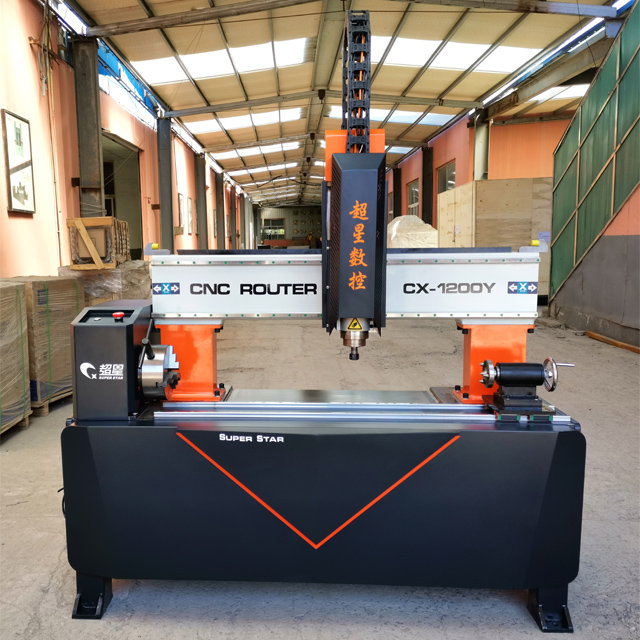
A standard single-spindle CNC router is the "Swiss Army Knife"—versatile and flexible. But when your order book fills up with 500 identical chair legs or 1,000 relief panels, that versatility becomes a bottleneck. This is where the Multi-Spindle & Rotary CNC Router enters the arena.
This guide compares these two heavyweights across efficiency, flexibility, and application to help you decide which investment will drive your business forward.
Performance Showdown: The Numbers Game
Let's break down the technical differences that impact your bottom line.
Moderate. Working width per head is limited (e.g., 300mm per head).
3D Capability
Limited (unless 4th axis added). Mostly 2.5D.
High. Designed for 360° rotary carving (statues, legs).
Setup Time
Fast (Zero one tool).
Slower (Must calibrate Z-height for all spindles).
Best For
Prototyping, Cabinetry, Custom Signs.
Mass Production, Furniture Legs, Molding.
1. Efficiency: The Multiplier Effect
The primary advantage of a multi-spindle machine is simple math. If a table leg takes 30 minutes to carve:
Standard CNC: Produces 16 legs in an 8-hour shift.
4-Spindle CNC: Produces 64 legs in the same shift. For high-volume orders, the multi-spindle machine pays for itself 4x faster.
2. Flexibility vs. Specialization
A standard machine allows you to cut a giant conference table one day and a small sign the next.
A multi-spindle machine is a specialist. While you can turn off extra spindles to cut a large sheet, its gantry is optimized for carrying multiple heavy motors, and the Z-axis clearance is usually higher to accommodate rotary devices.
Application Scenarios: Where Do They Belong?
Understanding your business model is key to choosing the right tool.
Verdict:Standard CNC (with ATC). You need the full table size and automatic tool changing more than you need multiple heads.
Scenario B: The Furniture Manufacturer
Needs: Producing 200 sets of "Queen Anne" style sofa legs and 500 meters of decorative trim per week.
Verdict:Multi-Spindle & Rotary CNC Router. A standard machine would be too slow. The rotary axis is essential for the 3D legs, and the multiple heads ensure you meet delivery deadlines.
Scenario C: The Art & Decor Studio
Needs: Carving intricate 3D statues, pillars, and relief wall art.
Verdict:Rotary CNC. Even for low volume, the 4-axis simultaneous capability is required to carve complex geometries that a 3-axis machine simply cannot do.
User Feedback: What the Industry Says
We gathered feedback from factory owners who have switched from standard to multi-spindle systems.
"The Game Changer""We used to run three standard machines to keep up with our stair baluster orders. It was a nightmare of maintenance and labor. We replaced them with one 8-spindle rotary machine. One operator now does the work of three, and the floor space savings are huge."— Production Manager, Solid Wood Furniture Factory
"The Learning Curve""The only downside is setup. You have to be precise when setting the Z-zero for 6 spindles. But once it's running, it's a money printer. Just don't expect to use it for cutting single kitchen cabinets efficiently."— Owner, Architectural Millwork Shop
Conclusion: Volume Dictates Choice
The decision between a Standard and a Multi-Spindle & Rotary CNC Router comes down to one word: Volume.
If you are a High-Mix, Low-Volume shop (many different designs, few copies), stick to a Standard CNC.
If you are a Low-Mix, High-Volume manufacturer (few designs, thousands of copies), the Multi-Spindle machine is the only logical choice.
Q1: Is a Multi-Spindle machine much more expensive than a standard one?
A: The cost is higher due to the extra motors, drives, and heavier gantry, but it is usually cheaper than buying 4 separate standard machines.
Q2: Can I add a rotary axis to my standard CNC later?
A: Yes, many standard machines can accept a 4th axis attachment. However, it will likely be a single rotary axis. If you need to turn 4 items at once, you need a dedicated multi-spindle frame.
Q3: Does the Multi-Spindle machine use more electricity?
A: Yes. Running 4 spindles (e.g., 2.2kW x 4) consumes more power than one. However, the energy cost per part produced is significantly lower because the vacuum pump (the biggest energy consumer) runs for less time to produce the same amount of goods.
Q4: What happens if I need to cut a large sheet on a multi-spindle machine?
A: You can do it. You simply park the extra spindles to the side (or raise them up) and use Spindle #1. However, verify the "effective working width" with us, as the parked spindles take up some gantry space.