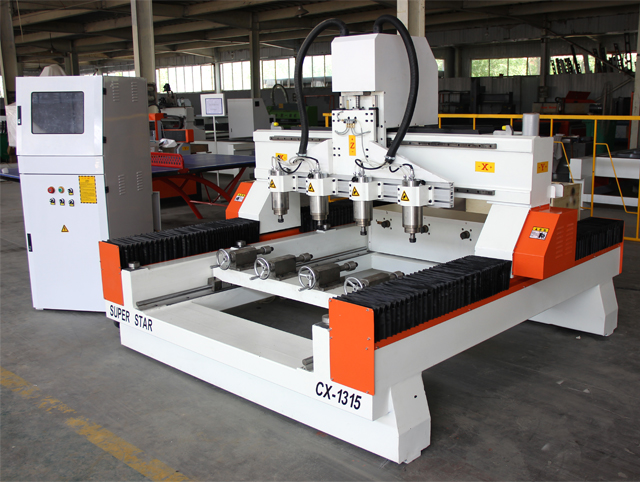
In the manufacturing world, time is currency. A Multi-Spindle & Rotary CNC Router is designed to be a high-volume workhorse, but owning one is only half the battle. The other half is how you use it.
Are you running your Ferrari in first gear? Many workshops utilize only 60% of their machine's potential due to unoptimized toolpaths, slow loading times, or poor material prep.
This guide provides actionable, technical strategies to squeeze every ounce of productivity out of your multi-head setup.
Optimizing Machine Settings: The "Software" Side
Efficiency starts in the CAM software (like ArtCAM, PowerMill, or Aspire). Small tweaks here save hours per week.
1. Optimize "Rapid Traverse" (G00) Heights
The Problem: The "Safe Z" height is often set too high (e.g., 50mm above the material). Every time the spindle lifts to move to a new spot, it wastes seconds.
The Fix: Lower the safe clearance to the minimum safe distance (e.g., 5mm or 10mm above the highest point of the rotation). Over a job with 1,000 retracts, this saves significant time.
2. Maximize Feed Rates & Chip Load
The Problem: Running too slow causes friction (burning) rather than cutting.
The Fix: Calculate the optimal "Chip Load." For a Multi-Spindle & Rotary CNC Router, the gantry is heavy and stable. Don't be afraid to push the feed rates (e.g., 15,000mm/min for roughing) as long as your tooling can handle it.
3. Smart Toolpath Strategy
Rotary Strategy: Instead of standard raster (back and forth) carving, use Spiral Machining for rotary parts. This keeps the tool in constant contact with the wood, eliminating the time wasted on acceleration and deceleration at the end of each pass.
Workflow Optimization: The "Hardware" Side
The machine is fast, but is the operator keeping up? Reducing "spindle downtime" is critical.
1. Quick-Change Fixtures (Jigs)
The Bottleneck: Manually screwing down 8 different workpieces can take 20 minutes.
The Solution: Invest in pneumatic clamps or quick-release toggle clamps. If you can reduce loading time from 20 minutes to 5 minutes, you gain an extra hour of production every 4 cycles.
2. Pendulum Processing (For Flat Tables)
The Strategy: If your machine has a large table, divide it into two zones. While the machine is cutting on Zone A, the operator unloads and reloads Zone B. This results in zero downtime for the machine.
3. Tool Maintenance
The Reality: A dull tool cuts slower and requires more sanding later.
The Fix: Implement a strict tool-change schedule based on hours run, not just when the tool breaks. Consistent sharp tools allow for faster feed rates and better finish quality.
Material Selection: Consistency is King
For multi-spindle machines, uniformity is non-negotiable.
1. Consistent Stock Dimensions
Why it matters: If you are turning 8 table legs, and one log is 5mm thicker than the others, you must set the "Safe Z" for the thickest log. This means the other 7 spindles are "cutting air" for the first few passes, wasting time.
Recommendation: Pre-process your stock (planing or rough turning) to ensure all blanks are identical before they hit the CNC.
2. Wood Moisture Content
Why it matters: Wet wood tends to "fuzz" rather than chip, requiring slower speeds and extensive post-processing (sanding).
Recommendation: Use kiln-dried lumber (6-8% moisture). It cuts cleaner, allows for faster feed rates, and reduces the load on your sanding department.
Conclusion: Efficiency is a System
Improving production efficiency isn't about pressing a "Fast Forward" button. It's about synchronizing your software settings, your operator's workflow, and your material preparation.
By implementing these strategies, your Multi-Spindle & Rotary CNC Router transforms from a machine into a profit-generating system.
A: Not necessarily. Bits usually break because of heat (moving too slow) or vibration (loose hold-down), not just speed. If you maintain the correct "Chip Load," you can run faster and cooler.
Q2: How do I handle dust collection for 8 spindles?
A: Standard dust collectors may struggle. Ensure you have a high-CFM industrial dust collector and that the ducting to each spindle is balanced. Clogged dust boots can cause fires and ruin finishes.
Q3: Is it better to rough cut on a different machine?
A: For very deep carvings, yes. Using a cheap band saw to remove the bulk of the waste wood before putting it on the CNC can save hours of machining time and extend the life of your expensive CNC motors.
Q4: What software is best for rotary efficiency?
A: PowerMill and Mastercam are excellent for advanced 4-axis simultaneous toolpaths. For standard furniture legs, ArtCAM or Aspire are sufficient and easier to learn.