Wood CNC Router Buying Guide: 10 Questions to Ask Before You Invest
Buying a wood CNC router is one of the most significant equipment investments a woodworking business, cabinet shop, or sign making studio will make. Get it right and the machine pays for itself many times over through improved production speed, better output quality, and the ability to take on work that was previously impossible. Get it wrong and you end up with a machine that does not fit your workflow, cannot handle your materials, or costs more in downtime and support issues than it saves in production.
The difference between a good investment and a poor one rarely comes down to price. It comes down to how clearly the buyer understands their own requirements before choosing a machine — and how thoroughly they evaluate the supplier before placing an order.
This guide presents the 10 most important questions every buyer should be able to answer before committing to a wood CNC router purchase. Work through each question carefully. The answers will guide you toward the right machine configuration, the right supplier, and a purchase decision you can make with confidence.
If you are already comparing specific models, you can browse our full range of Wood CNC Routers alongside this guide.
Question 1: What Will You Actually Be Making on This Machine?
This is the most fundamental question in the entire buying process — and the one most buyers answer too vaguely.
"Woodworking" is not a sufficient answer. A machine configured for high-volume cabinet panel cutting is very different from one optimized for 3D decorative carving. A machine suited to acrylic sign letter cutting has different spindle and table requirements from one designed for solid wood furniture components.
Before evaluating any machine, write down specific answers to the following:
What materials will you cut most frequently?
MDF, particleboard, plywood
Melamine-faced panels
Solid hardwood or softwood
Acrylic, PVC foam board, aluminum composite panel
HDU foam, corian, or other specialty materials
What products will you make?
Cabinet carcasses and doors
Furniture panels and components
Decorative carved panels and relief work
Signs, letters, and display graphics
Architectural millwork and custom joinery
What operations will the machine need to perform?
Through-cutting and profile routing
V-carving and engraving
3D relief carving
Drilling hardware holes
Edge profiling
The answers to these questions determine the correct machine size, spindle specification, table type, and software for your application. Every other question in this guide builds on this foundation.
Machine size — specifically the working area — must match the largest workpiece you regularly need to process. Buying a machine that is too small creates production bottlenecks from day one. Buying a machine that is significantly larger than you need wastes floor space and budget.
The Standard Size Reference Points
6090 (600×900mm working area)
Suited to small sign shops, advertising studios, and businesses focused on letter cutting, small panel work, and custom pieces. Cannot process a full standard sheet without repositioning. For a detailed comparison, see our article on 6090 vs 1325 CNC routers.
1212 / 1218 (1200×1200mm or 1200×1800mm)
A practical middle ground for businesses that need more capacity than a 6090 but do not regularly process full 4×8 sheets.
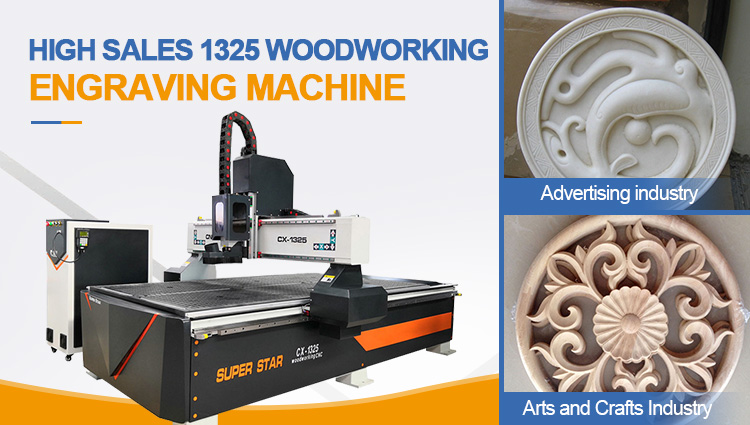
1325 (1300×2500mm)
The industry standard for cabinet making, furniture production, and full-service sign shops. Processes a full 4×8 foot (1220×2440mm) sheet in a single setup. The most widely used size for professional woodworking production worldwide.
1530 / 2030 (1500×3000mm or 2000×3000mm)
For high-volume industrial production, oversized panel processing, or operations where maximizing nesting efficiency across a larger sheet is a priority.
Key Sizing Considerations
Always size the machine for your largest regular workpiece, not your average workpiece
Account for the vacuum zone coverage area — the effective holding area is slightly smaller than the stated working area on most vacuum table machines
Consider future production growth — if you expect your business to scale, buying a slightly larger machine now avoids an early replacement
Question 3: What Spindle Power and Type Do You Need?
The spindle is the heart of the CNC router. Its power rating, speed range, and cooling type determine what materials you can cut, how fast you can cut them, and how reliably the machine performs under sustained production conditions.
Spindle Power by Application
Application
Recommended Spindle Power
Light sign work, foam, thin acrylic
1.5kW – 2.2kW
General woodworking, mixed sign work
3.0kW – 4.5kW
Cabinet production, full-shift MDF cutting
4.5kW – 6.0kW
Heavy solid wood, industrial production
6.0kW – 9.0kW
Underpowered spindles strain during full-depth cuts in dense materials, generate excessive heat, wear tools faster, and produce rougher edges. For any serious production use, do not underestimate spindle power requirements.
Water-Cooled vs Air-Cooled
Water-cooled spindles maintain lower operating temperatures during extended production runs, operate more quietly, and have a longer service life under sustained use. They are the preferred choice for production environments where the machine runs for multiple hours per day.
Air-cooled spindles are simpler to maintain — no cooling water circuit to manage — and are a practical choice for lighter production schedules. They run hotter and louder under sustained load.
Manual Tool Change vs Automatic Tool Change (ATC)
If your production regularly requires multiple tools in a single job — for example, a compression bit for panel cutting followed by a V-bit for edge detailing and a drill bit for hardware holes — an ATC spindle eliminates manual tool changes and significantly reduces cycle time.
For operations with frequent tool changes or high job volumes, the productivity gain from an ATC spindle typically justifies the additional investment. We offer ATC wood CNC router configurations for buyers whose production requirements suit automatic tool changing.
Question 4: What Table Type Do You Need?
The machine table determines how workpieces are held during cutting. Choosing the wrong table type for your materials and workflow creates daily frustration and production problems.
Vacuum Table
A vacuum table holds flat sheet materials — MDF, particleboard, plywood, acrylic, foam board, ACP — securely across the full sheet surface without mechanical clamps. It is the preferred choice for:
Cabinet panel production with melamine-faced sheets
Full-sheet sign panel cutting
Any application where clamps would interfere with the cutting path
High-volume sheet processing where fast loading and unloading matters
For a vacuum table to work effectively, the vacuum pump must be adequately sized for the table area and production volume. A multi-zone vacuum table allows individual zones to be activated based on workpiece size, maintaining strong suction even when cutting smaller pieces.
T-Slot Table
A T-slot table uses mechanical clamps and fixtures to hold workpieces. It is better suited for:
Solid wood components and irregular workpieces that do not lie flat
Jig-based production where fixtures are used for repeat positioning
Mixed material work where vacuum hold is not always effective
Combination Table
A combination vacuum and T-slot table provides maximum flexibility for workshops processing a wide variety of materials and workpiece types.
The drive system — the motors and controllers that move the machine axes — determines positioning accuracy, long-term reliability, and performance under production load.
Stepper Motors
Stepper motors are the standard drive system on entry-level and mid-range CNC routers. They are reliable for lighter production schedules and are simpler and less expensive to maintain.
Limitations for intensive production:
Can lose steps under heavy cutting load, causing positional errors
Do not provide feedback to the control system — errors are not detected or corrected automatically
Generate more heat during sustained high-speed operation
Long-term accuracy can degrade faster under continuous production conditions
Servo Motors
Servo motors with closed-loop feedback are the preferred drive system for serious production use because:
They maintain accurate positioning even under heavy cutting loads
The closed-loop system detects and corrects positioning errors in real time
They run cooler and more efficiently during long production shifts
They maintain consistent accuracy over a longer service life
They support higher feed rates, increasing production throughput
The practical recommendation: For businesses running the machine one shift per day or less on lighter materials, stepper motors are adequate. For factories running full production shifts on dense materials such as MDF and particleboard, servo motors are the better long-term investment.
Question 6: What Control System and Software Will You Use?
The control system and CAM software determine how easy the machine is to operate daily, how compatible it is with your design workflow, and how quickly new operators can get up to speed.
Control System Options
DSP offline controller — A standalone handheld unit that allows the machine to run production programs from a USB drive without a connected PC. The most practical choice for production floor operation. Simple to learn, reliable, and widely used in industrial woodworking.
Syntec controller — A professional industrial control system suited to more complex multi-axis machines and high-volume production environments.
PC-based controller (Mach3/Mach4) — Flexible and widely supported, but requires a dedicated PC connected to the machine during operation.
CAM Software Compatibility
Confirm that the machine is compatible with the CAM software you plan to use. Key questions:
Does the supplier provide the correct post-processor file for your preferred CAM software?
Is the machine compatible with Vectric VCarve Pro, Aspire, Ucancam, or other software you already use?
Is any CAM software included with the machine, or must it be purchased separately?
Tooling is a recurring production cost that many buyers underestimate when budgeting for a new CNC router. The right bits for your materials and operations are as important as the machine itself.
Key Tooling Questions
What bit types do you need for your primary materials?
Compression spiral bits for melamine-faced panels
O-flute bits for acrylic cutting
V-bits for sign carving and engraving
Ball-nose bits for 3D relief work
Spoilboard surfacing cutter for table maintenance
What collet sizes does the spindle accept?
Confirm that the spindle's collet specification matches the shank sizes of the bits you plan to use. Common sizes are 6mm, 8mm, and 12mm in metric markets.
What is the ongoing tooling cost for your production volume?
High-volume MDF cutting wears bits faster than solid wood. Budget for regular bit replacement as a production running cost.
For a complete guide to selecting the right bits for each material and operation, see our article on CNC router bits for woodworking.
Question 8: What Certifications Does the Machine Need?
Depending on your market and application, the machine may need to meet specific certification requirements for legal compliance, insurance purposes, or customer requirements.
CE Certification
CE marking is required for machinery sold and operated in the European Economic Area. It confirms that the machine meets EU safety, health, and environmental requirements. If you are based in Europe or export products to European markets, CE certification is not optional.
What to verify:
Does the machine carry genuine CE certification — not just a label?
Can the supplier provide the CE declaration of conformity document?
Has the machine been assessed against the relevant machinery directive requirements?
Electrical Specification
Confirm that the machine's electrical specification matches your local power supply:
Voltage (220V single phase, 380V three phase, or other)
Frequency (50Hz or 60Hz)
Phase configuration
A reliable manufacturer will configure the machine for your local electrical specification at the time of order. Our wood CNC router models are available in configurations for different market electrical standards.
Other Certifications
Depending on your market, you may also need to verify RoHS compliance for electronic components, ISO quality management certification for the manufacturer, or specific local safety standards.
Question 9: What After-Sales Support Does the Supplier Provide?
After-sales support is the factor that most separates reliable suppliers from unreliable ones — and the factor that has the greatest impact on your experience as a machine owner after the sale is complete.
A CNC router is a complex piece of production equipment. Issues will arise during its working life — setup questions, parameter adjustments, component wear, software updates, and occasional faults. How quickly and effectively your supplier responds to these situations directly affects your production uptime and your confidence in the machine.
Essential After-Sales Questions
Installation support
Does the supplier provide installation guidance, documentation, and remote support during the setup process? For international buyers installing the machine without an on-site engineer, clear installation documentation and responsive remote support are essential.
Operator training
Does the supplier provide training materials, videos, or remote training sessions to help new operators get productive quickly?
Technical support response time
When a production problem occurs, how quickly does the supplier's technical team respond? Through what channels — email, video call, messaging app? Slow support response means production downtime.
Spare parts availability
Are spare parts for wear components — spindle bearings, drive belts, vacuum pump parts, control boards — available from the supplier? What is the typical delivery time for spare parts to your location?
Warranty terms
What is the warranty period? What components are covered? What is the process for making a warranty claim? Are there any conditions that void the warranty?
Long-term support commitment
Will the supplier still be able to support the machine in five years? A manufacturer with a long track record and an established export business is more likely to provide consistent long-term support than a newer or smaller operation.
We provide installation guidance, remote technical support, operator training assistance, and spare parts supply for all machines in our wood CNC router range. Our technical team supports buyers through video call, email, and messaging platforms throughout installation and production startup — and beyond.
Question 10: What Is the Total Cost of Ownership?
The purchase price of a CNC router is only one component of the total cost of ownership. Buyers who evaluate only the upfront price often find that a cheaper machine costs more over its working life than a better-specified alternative.
Components of Total Cost of Ownership
Purchase price
The initial machine cost, including any customization, upgraded components, or additional accessories.
Shipping and import costs
For international purchases, freight, insurance, import duties, and customs clearance fees add significantly to the landed cost of the machine. Get a clear picture of the total landed cost before comparing prices from different suppliers.
Installation costs
Electrical connection by a qualified electrician, any civil work required for the machine foundation, and the cost of the operator's time during setup and initial training.
Tooling costs
The initial bit kit and ongoing bit replacement costs based on your production volume and materials.
Software costs
CAM software licensing — professional tools like Vectric VCarve Pro or Aspire have licensing costs that should be budgeted as part of the total investment.
Maintenance costs
Lubricants, replacement wear parts, vacuum pump maintenance, and spindle servicing over the machine's working life.
Downtime costs
The cost of production stops caused by machine faults, slow support response, or unavailable spare parts. A machine with better build quality, better after-sales support, and readily available spare parts has lower effective downtime costs even if its purchase price is higher.
Productivity value
The value the machine adds through increased production speed, better output quality, reduced labor costs, and the ability to take on new types of work. A well-specified machine that runs reliably and accurately generates more value per year than a cheaper machine that requires frequent adjustment or produces more rejects.
The Right Question Is Not "What Is the Cheapest Machine?" But "Which Machine Delivers the Best Value Over Its Working Life?"
A machine that costs 20% more upfront but lasts twice as long, requires less maintenance, produces better quality output, and comes with responsive after-sales support will almost always deliver better total value than the cheapest option available.
Putting It All Together: A Pre-Purchase Decision Framework
Before placing an order for any wood CNC router, confirm that you can answer all 10 questions clearly.
When you can answer all 10 questions with confidence, you are ready to make a well-informed purchase decision.
How to Use This Guide with Our Product Range
Our Wood CNC Router product category covers a range of machine sizes and configurations suited to cabinet making, furniture production, sign making, decorative carving, and general woodworking.
For buyers who want to go deeper on specific topics before making a decision, the following guides cover each question area in detail:
If you have worked through this guide and are ready to discuss specific machine configurations, pricing, and delivery for your application, contact us with details about your materials, products, production volume, and workshop space. Our team will recommend the most suitable configuration and provide a complete quotation.
Frequently Asked Questions
How much does a wood CNC router cost?
Wood CNC router prices vary widely depending on machine size, spindle specification, drive system, and table configuration. Entry-level 6090 machines start from a few thousand dollars. Professional 1325 machines with servo drives, vacuum tables, and ATC spindles range from mid-range to premium pricing depending on specification. Always evaluate total cost of ownership — including shipping, tooling, software, and support — rather than purchase price alone.
How long does a wood CNC router last?
A well-built wood CNC router with proper maintenance should provide 8–15 years or more of productive service life. Key factors affecting longevity include build quality, component grade, production intensity, maintenance discipline, and the quality of after-sales support. For maintenance best practices, see our guide on CNC router maintenance tips.
Is a 1325 CNC router suitable for a small workshop?
Yes, provided the workshop has adequate floor space and power supply. The 1325 is the most practical size for any business that regularly processes full standard sheets. If floor space is genuinely limited and your work does not require full-sheet processing, a 6090 or 1212 may be more appropriate.
Do I need servo motors or are stepper motors sufficient?
For light to medium production — one shift per day or less, lighter materials, custom work — stepper motors are adequate. For intensive production — full shifts, dense materials like MDF and particleboard, high accuracy requirements — servo motors with closed-loop feedback are the better long-term investment.
What software do I need to run a wood CNC router?
You need three types of software: design software (CAD) to create or prepare artwork, CAM software to generate cutting toolpaths, and a control system to operate the machine. For most woodworking applications, CorelDRAW or AutoCAD for design, Vectric VCarve Pro for CAM, and a DSP offline controller for machine operation is a practical and widely used combination. For a full comparison, see our guide on best CNC router software for woodworking.
Can I buy a wood CNC router directly from a Chinese manufacturer?
Yes. Purchasing directly from a Chinese manufacturer can offer significant advantages in price, customization flexibility, and access to a wide range of configurations. The key is evaluating the supplier carefully before ordering. For a complete guide to this process, see our article on what to check before buying a CNC router from a Chinese manufacturer.
Ready to find the right wood CNC router for your business?
Browse our Wood CNC Router product category or contact us with your materials, products, and production requirements. Our team will recommend the most suitable configuration and provide a complete quotation.