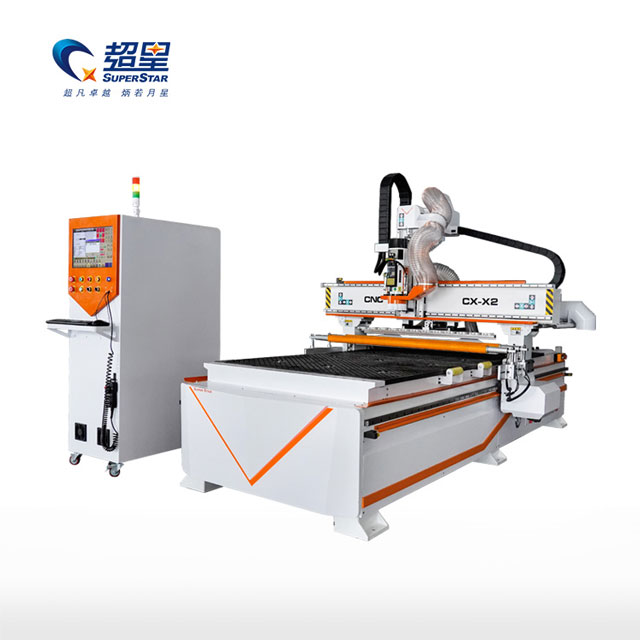
In a high-production environment, downtime is the enemy. An ATC (Automatic Tool Changer) CNC Router is a complex ecosystem of mechanics, electronics, and pneumatics. While modern machines are built for reliability, issues can arise due to wear, operator error, or environmental factors.
When your machine stops, you need answers fast. Is it a software glitch? A sensor failure? Or a mechanical jam?
This guide categorizes the most common faults encountered by operators of ATC CNC Routers and provides actionable technical solutions to get your production back on track.
Common Fault 1: Tool Change Failure (ATC Error)
The automatic tool changer is the defining feature of these machines, but it is also the most complex.
Symptoms:
The machine stops during a tool change.
The spindle does not release the tool.
The carousel (magazine) does not rotate to the correct position.
Alarm: "Drawbar Error" or "Tool Position Error."
Root Cause Analysis:
Low Air Pressure: The #1 cause. The spindle drawbar requires 6-8 bar (90+ PSI) to compress the spring and release the tool.
Sensor Misalignment: Proximity sensors detect if a tool is in the fork. Dust or vibration can shift these sensors.
Dirty Tool Taper: Resin or sawdust buildup inside the spindle shaft or on the ISO30 holder prevents the tool from seating or ejecting smoothly.
Solution:
Check Pneumatics: Verify your air compressor is running and the regulator on the machine reads at least 0.6 MPa. Drain water from the air filter.
Clean Sensors: Wipe the proximity sensors on the tool magazine with a clean cloth.
Maintenance: Clean the tool holder tapers daily with a specialized cleaner and apply a dry lubricant.
Common Fault 2: Spindle Not Spinning or Stalling
Symptoms:
The program starts, but the spindle doesn't turn.
The spindle stops mid-cut (stalls).
VFD (Inverter) displays an error code.
Root Cause Analysis:
VFD Error: The Variable Frequency Drive (VFD) protects the spindle. It may trip due to over-current (cutting too deep/fast) or under-voltage (unstable power supply).
Wiring Issues: Loose connections between the VFD and the spindle motor.
Mechanical Jam: The bearings are seized (rare) or the bit is stuck in the material.
Solution:
Check VFD Code: Look at the display on the inverter (e.g., "E-OC" for Over Current). Refer to the manual. Usually, resetting the power clears it.
Reduce Load: If the spindle stalls during cutting, reduce your Feed Rate or take shallower passes. Your settings might be exceeding the machine's power rating.
Inspect Wiring: With power OFF, check the aviation plug on the spindle for loose wires or burn marks.
Common Fault 3: Uneven Cutting Depth (Z-Axis Issues)
Symptoms:
The machine cuts through the material on one side of the table but not the other.
The cut depth changes randomly during the job.
Root Cause Analysis:
Uneven Spoilboard: The sacrificial board (MDF) has not been surfaced recently.
Loose Collet: The tool is slipping inside the collet during the cut.
Lost Steps: The Z-axis motor lost position due to excessive speed or mechanical binding.
Solution:
Surface the Spoilboard: Run a "fly-cut" program to flatten your MDF spoilboard. This ensures the surface is perfectly parallel to the spindle movement.
Tighten Properly: Ensure the collet is snapped into the nut before inserting the bit. Tighten to the recommended torque.
Check Couplings: Inspect the flexible coupling connecting the Z-axis motor to the ball screw. If it's loose, tighten the screws.
Common Fault 4: Rough Edge Finish (Chatter)
Symptoms:
Wavy marks on the edge of the wood.
Loud screeching noise during cutting.
Root Cause Analysis:
Dull Tooling: A blunt bit pushes the wood rather than cutting it, causing vibration.
Workholding: The vacuum table isn't holding the part firmly enough, causing it to vibrate.
Mechanical Play: Wear in the linear bearings or rack-and-pinion gears.
Solution:
Swap the Bit: Always start troubleshooting cut quality by using a brand-new, sharp bit.
Check Vacuum: Ensure the rubber gasket is intact and covering unused zones to maximize suction.
Inspect Mechanics: Try to wiggle the gantry by hand (with power off). If there is play, the eccentric nuts on the bearings may need adjustment.
Conclusion: Prevention is Better than Cure
Most "faults" are actually symptoms of neglected maintenance. A strict cleaning and lubrication schedule can prevent 90% of these issues.
However, if you find yourself constantly troubleshooting an aging machine, the cost of downtime may outweigh the cost of an upgrade. Modern machines feature self-diagnostic systems that make troubleshooting easier.
Explore our reliable and robust ATC CNC Router Product List to see how our latest models are designed to minimize maintenance and maximize uptime.
FAQ: Frequently Asked Questions
Q1: How do I reset a "Limit Switch" alarm?
A: This happens when the machine travels too far. In the control software (like Syntec), there is usually an "Over-travel Release" or "Limit Override" button. Hold it down, and manually jog the machine away from the limit switch.
Q2: Why is my CNC router losing position (losing steps)?
A: Common causes are: 1) Feed rate too high for the motors. 2) Mechanical binding (lack of oil on rails). 3) Electrical interference (grounding issue). Check lubrication first.
Q3: What does "Soft Limit Error" mean?
A: This is a software safety feature. It means the G-code program you loaded tries to move the machine outside its defined working area (e.g., trying to cut at X=3000mm on a 2500mm table). Check your CAM software origin point.
Q4: My vacuum pump is running but suction is weak. Why?
A: Check the air filter on the vacuum pump intake. It is likely clogged with sawdust. Also, check for leaks in the PVC piping connecting the pump to the table.