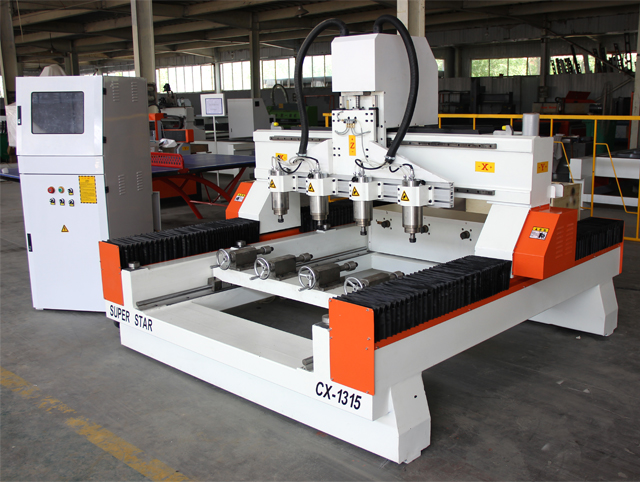
Congratulations on deploying a Multi-Spindle & Rotary CNC Router in your workshop. You have moved beyond simple cutting into the realm of high-efficiency mass production.
However, with great power comes great responsibility. A machine with 4, 6, or 8 spindles requires a different approach than a standard single-head router. If one spindle is slightly lower than the others, you ruin one part; if the rotary axis isn't centered, your carvings will be distorted.
This guide covers the essential operational steps and maintenance routines to keep your production line running smoothly and profitably.
Step-by-Step Operation: Getting Started
Operating a multi-head machine is about synchronization. Here is how to set it up correctly.
1. The "Z-Zero" Calibration (Crucial!)
On a single-head machine, you only set the tool height once. On a Multi-Spindle CNC Router, all spindles must be at the exact same height.
The Risk: If Spindle #1 is 0.5mm lower than Spindle #2, the first part will be cut too deep, while the second is too shallow.
The Fix: Use a dial indicator or a mobile tool sensor. Lower the Z-axis until the first bit touches the sensor. Then, manually adjust the motor mount of the second, third, and fourth spindles until they register the exact same height.
2. Rotary Axis Setup (The 4th Axis)
When switching from flat carving to rotary carving:
Find the Center: The "Z-Zero" for rotary work is usually the center of the chuck, not the surface of the wood.
Secure the Stock: Ensure the tailstock (the non-motorized end) is locked tight against the workpiece. Loose stock will vibrate and result in "chatter marks" on the finished product.
3. Tool Changing Protocol
Most multi-spindle machines use manual collet changes (ER25/ER32).
Cleanliness: Before inserting a new collet, wipe the spindle cone with a clean cloth. Dust inside the spindle causes "run-out" (wobble), which breaks tools.
Consistency: Ensure all tools stick out the same length if possible, to minimize the need for re-calibration.
Maintenance: Protecting Your Investment
A well-maintained machine prints money. A neglected one prints invoices for repairs.
1. Daily: The "Clean & Lube" Routine
Dust Extraction: Wood dust absorbs oil. At the end of every shift, blow off the dust from the gantry and rails.
Lubrication: Check the oil reservoir. Multi-spindle machines are heavy; the linear guide rails need constant lubrication (usually ISO 68 Way Oil) to prevent friction and wear.
Check Flow: Ensure water is flowing through all spindles. A kink in one tube can burn out a motor in minutes.
Check Quality: If the water looks cloudy or has algae, flush the system and refill with clean water mixed with a little anti-corrosion fluid.
3. Monthly: Electronics & Tightening
Vibration is unavoidable in machining.
Check Connections: Open the control cabinet (with power OFF) and check for loose terminal screws.
Belt Tension: If your rotary axis uses belts, check the tension. A loose belt causes "backlash," leading to oval shapes instead of perfect circles.
Conclusion: Consistency is Key
The Multi-Spindle & Rotary CNC Router is a workhorse designed for volume. By following these calibration and maintenance steps, you ensure that the 1,000th table leg you produce is identical to the 1st one.
Q1: How often should I calibrate the Z-height of the spindles?
A: You should check it every time you change tools. Even a small difference in how far you insert the bit into the collet will affect the cut depth.
Q2: Can I run the machine if one spindle is broken?
A: Yes. Most controllers allow you to disable a specific spindle output. However, you should remove the tool from the broken spindle to prevent accidents and fix it ASAP.
Q3: What kind of grease should I use for the rotary axis?
A: For the chuck and tailstock bearings, standard lithium-based grease is usually sufficient. For the linear rails of the machine, use the recommended rail oil (often ISO 68).
Q4: Why is my rotary carving coming out oval instead of round?
A: This is usually a "step value" (pulse equivalent) error in the settings or a loose belt on the rotary axis. Recalibrate the A-axis steps per degree in your controller.